Any Concept Can Be A Kanban Board
EtherPK now has Kanban boards. Any concept in your graph can have one, whether it's a page or a journal entry. A board lays out the tasks referenced under that concept as cards in lanes, with one lane for each state a task can be in. You don't set anything up first, because the board is built from the tasks you've already written in your notes. Moving a card edits the task in its note.
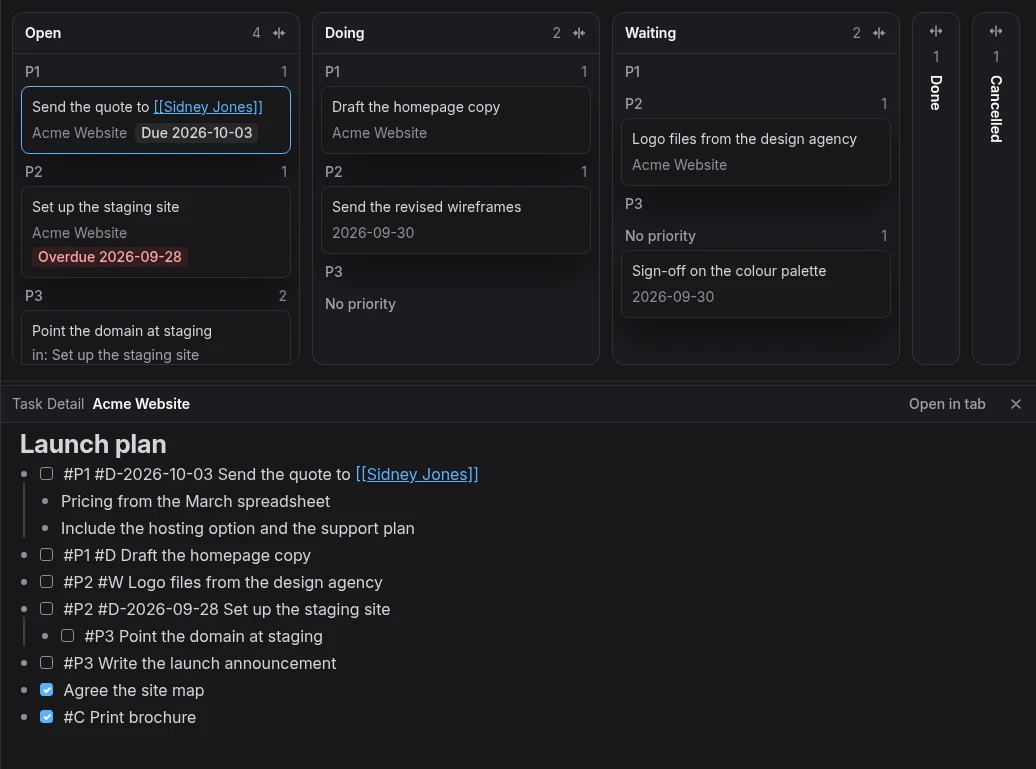
The board IS your notes
I didn't want boards that live somewhere apart from the notes. Tasks in EtherPK are ordinary
markdown checklist items, like - [ ] Send the quote, written wherever the work comes up: a
project page, a meeting note or today's journal. Their state is already in the text, in the
checkbox and the state tags #D (doing) and #W (waiting). So the board's lanes are those
states, and each card sits where its line puts it:
| Lane | The task's line |
|---|---|
| Open | - [ ] Send the quote |
| Doing | - [ ] #D Send the quote |
| Waiting | - [ ] #W Send the quote |
| Done | - [x] Send the quote |
| Cancelled | - [x] #C Send the quote |
Each lane is split into sections for P1, P2, P3 and No priority, from the task's priority tag.
When you drag a card from Open to Doing, EtherPK adds #D to the task's line and changes nothing
else. The board stores nothing of its own, so the board, the note, the Tasks view and your
other devices always agree. On a local graph the move is an edit to a plain markdown file, so it
shows up in git like any edit you type.
Any concept, not just projects
A board belongs to a concept, and in EtherPK a concept is any name in your graph: a page, a
journal day, or a name you've linked but haven't written a page for yet. A task is about a concept
when the concept is linked on the task's line, or on a bullet or heading above it. A task is also
about the page it's on and the concepts in that page's name, so the tasks on [[Acme]] Website
are about Acme too. So boards aren't limited to projects. For example:
- A board for a person shows what you're waiting on them for and what you owe them, from every note that mentions them.
- A board for a client,
Acme, also picks up the tasks on[[Acme]] Websiteand on every other page named within Acme. - A board for a day shows the tasks in that day's journal entry.
Here is the board for a person, Sidney Jones. Its tasks come from three documents: the project page, Sidney's own page and the journal entry for a call.
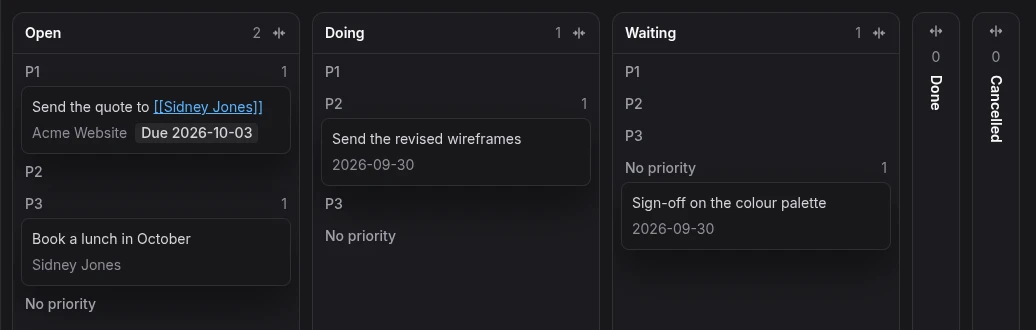
Working through a board
Clicking a card opens its task in the Task Detail, an editor below the board that shows the task's document with the task at the top and its notes underneath. The keyboard stays on the board, so the arrow keys keep moving between cards. Press Enter again to start typing at the end of the task's line, and Escape to go back to the board. Alt with an arrow key moves a card to the next lane or section, and Ctrl+Z undoes the board's last move.
Handing a card to an agent
Right-click a card and choose Copy task reference to copy the task with an address that finds it again, even after the note around it has changed. Paste it to an AI agent that's connected to your graph through the EtherPK MCP server, and it can read the task and its notes, move it along the board and add a note when the work is done.
Try it
To open a board, right-click a document's tab and choose Open Kanban board, or type /kanban
in the editor. Boards need a desktop or a wide window. The
Kanban boards documentation covers the rest, including
exactly which tasks appear on a board.